Security
Put a physical key on your accounts
AI has widened the attack surface and made every attack more effective, and text-message or app codes can be stolen through a fake site: here’s why you should drop your phone number and how to put a physical key on the accounts that matter
Danilo Giudice · November 6, 2026
Ask an AI
- Type
- Security: what is happening and what to do right now
- Time
- 6 min read
- Level
- Beginner
- What you’ll get
- Why to drop your phone number
- A physical key on the accounts that matter
- What to do if you lose the key
Contents · 10 sections
Backstory#
I recently bought two YubiKeys and registered them on the accounts that would ruin me if someone stole them: my password manager, my email, and my social accounts.
What to do right now#
- Today. Turn on two-step verification on every account, with an authenticator app or a passkey. Never with text messages (SMS).
- Today. Remove your phone number from verification and recovery, wherever the service lets you.
- This week. Buy three new keys from the Yubico store. The Security Key C NFC is enough, at €35.38 each; the YubiKey 5C NFC, at €70.76, adds six-digit codes (prices on Yubico’s Italian store, VAT included).
- When they arrive. Set a PIN with Yubico Authenticator and register all three keys: your email first, then your password manager, then everything else. Yubico’s setup guide shows where to find the option.
- Right after. Print your recovery codes and keep them outside your password manager.
- Always. One key on your key ring, always with you; the other two in two separate, well-protected places. If you lose one, remove it from every account right away.
Why now#
AI has widened the attack surface, meaning all the ways someone can try to get in: messages, phone calls, and video calls with generated voices and faces. And it has made phishing, the message that lures you to a fake site, as effective as an expert’s (Heiding, Schneier, and others).
Security
AI scam emails convince like the experts
Click rate on tailored phishing emails: a test with 101 people.
Same clicks, no flesh-and-blood scammer.
Source: Heiding, Schneier and others, 2024

AI scam emails convince like the experts. Click rate on tailored phishing emails: a test with 101 people. Generic 12%, Experts 54%, AI only 54%, AI+human 56%. Same clicks, no flesh-and-blood scammer. Source: Heiding, Schneier and others, 2024.
Attackers have adapted. According to the 2026 Microsoft Digital Defense Report, password-only attacks fell 26% in a year, and 44.6% of phishing techniques use kits that steal your codes too. In a campaign described by Anthropic, AI carried out 80–90% of the work. In Italy, in the first half of 2026, phishing incidents had already reached two-thirds of the total for all of 2025 (Clusit).
Your email is the safe#
Security
Whoever has your email has everything
Your Google or Apple account is the way into almost everything.
Google/Apple email
Other services
signs you into
Every password
resets
Saved passkeys
syncs your
Photos, documents
stores your
Concept map
Whoever has your email has everything. Your Google or Apple account is the way into almost everything. Google/Apple email signs you into Other services; Google/Apple email resets Every password; Google/Apple email syncs your Saved passkeys; Google/Apple email stores your Photos, documents. Concept map.
We used our Google or Apple email to sign up for everything: password resets land there, and “Sign in with Google” and “Sign in with Apple” run through it. If someone steals that, we’re screwed. Your first YubiKey gets set up there.
Why not your phone number#
Security
From weakest to strongest
The ways to do two-step verification, and how they get beaten.
- 1
SMS and calls
Stolen by SIM swap or fake site
- 2
App code
You can type it on a fake site
- 3
Push notification
One tired tap on “Yes” is enough
- 4
Passkey
Tied to the site, lives in your account
- 5
Physical key
Tied to the site, never leaves the key
Sources: NIST SP 800-63B-4; Microsoft 2026
From weakest to strongest. The ways to do two-step verification, and how they get beaten. 1. SMS and calls: Stolen by SIM swap or fake site; 2. App code: You can type it on a fake site; 3. Push notification: One tired tap on “Yes” is enough; 4. Passkey: Tied to the site, lives in your account; 5. Physical key: Tied to the site, never leaves the key. Sources: NIST SP 800-63B-4; Microsoft 2026.
With a SIM swap, an attacker pretends to be you and convinces your carrier to move your number to their SIM: your codes and password resets go to them. And sometimes we type the codes ourselves, but on a fake site we believe is real, and the fake site passes them straight to the real one.
A YubiKey, on the other hand, is tied to the real site and will never work on the fake one. In 2022, three Cloudflare employees typed their credentials into a fake site, and nothing happened: they all signed in with a physical key.
What a YubiKey is and how it works#
A YubiKey is a small key with no battery that lives on your key ring and holds your sign-in keys: only it can use them, and they can’t be copied. You plug it into your computer or phone through USB-C, or tap it on your phone over NFC.
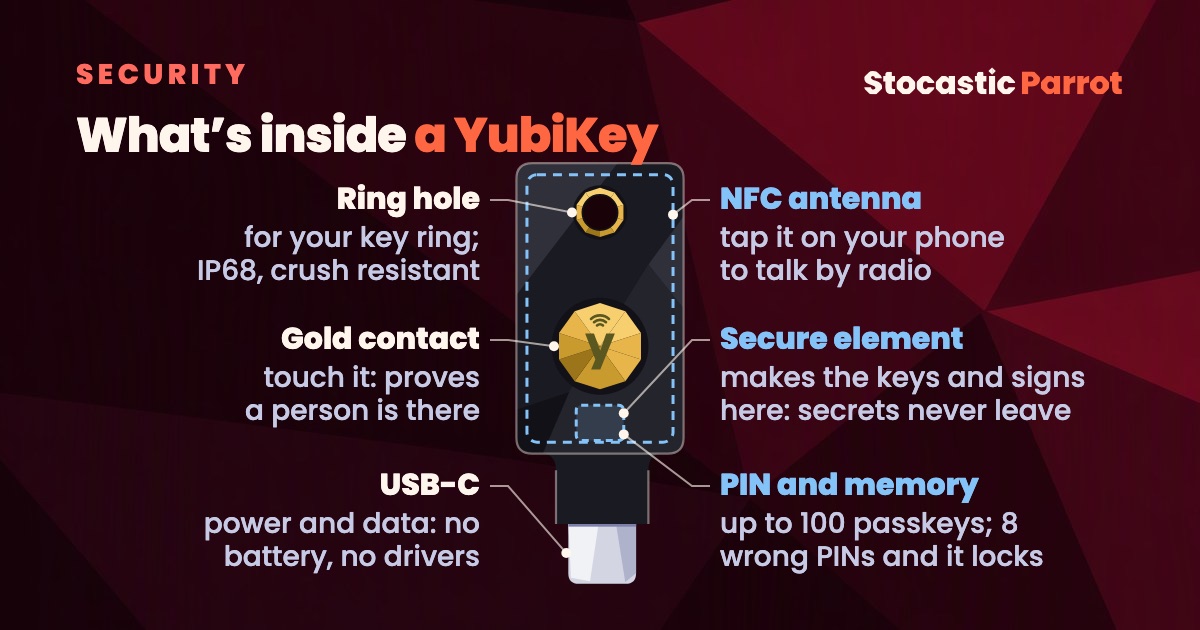
When you register it on a site, the key creates a key pair just for that site: only the key can use the private one, and the public one goes to the site. Every time you sign in, the site sends a request to sign. You touch the gold contact, which confirms that a person is there and not a program, and the key signs, but only if the address is the one it registered. You don’t type anything, so there’s nothing to steal.
The parts, one by one
- Gold contact. It’s a sensor, not a button: it has no moving parts. Touching it tells the key that a person is there and not a program, the “user presence” check in the FIDO standard. The waves above the “y” mean NFC.
- USB-C. It carries power and data, because the key has no battery. Browsers and operating systems recognize it on their own through the WebAuthn standard, with no drivers or apps.
- NFC antenna. It sits inside the case: you tap the key on the back of your phone, and the exchange happens by radio, a few centimeters away.
- Secure element. The chip that creates the keys and signs requests inside itself: the secrets never leave, and the firmware can’t be rewritten, not even by Yubico.
- PIN and memory. Today’s YubiKeys hold up to 100 passkeys. You choose the PIN: after 8 wrong attempts, the FIDO part locks and has to be reset, passkeys included.
- Ring hole and case. Glass-fiber reinforced plastic, IP68 against water and dust, and crush resistant: it’s built to live on your key ring.
Key or passkey?#
A passkey is the same technology, saved on your phone or in your password manager, and for most accounts it’s enough. But it’s only as safe as the account that syncs it, which is usually your email. My rule: a physical key on your email and password manager, passkeys on everything else.
Where they work, as of November 5, 2026 (“—” means not listed):
| Service | Physical key | Passkey |
|---|---|---|
| Google and Gmail | yes | yes |
| Apple | yes, at least two | — |
| Microsoft and Outlook | yes | yes |
| 1Password | yes | — |
| Bitwarden | yes, even on the free plan | — |
| yes | yes | |
| — | only if linked to Facebook | |
| — | yes | |
| — | yes | |
| X | yes | yes |
The rules everyone repeats#
The ones from the Cyber Aware campaign by the UK’s cybersecurity agency, plus a few of mine:
- A different password for every account, in a password manager.
- For your email, a strong password used only there.
- Two-step verification everywhere, without a phone number.
- Automatic updates for your system, browser, and apps.
- A backup of your photos and documents off your computer.
- When something is urgent, check through another channel: in 2024, an Arup employee transferred about $25 million after a video call with colleagues generated by AI (CNN).
- Check whether your email is already out there on Have I Been Pwned.
- Three YubiKeys: one on your key ring, always with you, and the other two in two separate, well-protected places.
The limits#
- If you lose all of them, you can be locked out of your account for good, as Apple warns. NON-NEGOTIABLE: three keys, registered the same day, and printed recovery codes.
- EUCLEAK: YubiKeys with firmware older than 5.7 can be cloned, but it takes the key in hand and about €10,000 of equipment (NinjaLab). The ones sold today ship with 5.8.
- Not everywhere: on Instagram, WhatsApp, and LinkedIn, physical keys aren’t listed, and I couldn’t find confirmation for Italian banks.
Three keys against a language model#
My advice is simple: everyone out there wants to screw you over, at any moment. Getting three keys would be ideal: one always with you, and two in separate safes, in different homes, to spread the risk. Our digital lives are more at risk than ever with the rise of LLMs: protecting yourself has never mattered more.
I’ll repeat the rest of the week for you, parrot-fashion
I keep up with AI, so on Monday morning you know what to try and what to ignore, with sources you can check.
Prefer Telegram? News and tutorials go up there, in Italian, as soon as they come out.
Notify me on Telegram
Sources
Facts checked on November 5, 2026; prices and services change.
- F. Heiding, B. Schneier, and others, “Evaluating Large Language Models’ Capability to Launch Fully Automated Spear Phishing Campaigns”, arXiv, 2024; Expert Systems with Applications, 2026.
- Microsoft, “2026 Microsoft Digital Defense Report”, October 2026 (pp. 45 and 64).
- Anthropic, “Disrupting the first reported AI-orchestrated cyber espionage campaign”, November 13, 2025.
- Clusit (the Italian information security association), Clusit Report, October 2026 update, in Italian.
- NIST, SP 800-63B-4, July 2025.
- Cloudflare, “The mechanics of a sophisticated phishing scam and how we stopped it”, August 9, 2022.
- NCSC, “Cyber Aware”.
- CNN, “British engineering giant Arup revealed as $25 million deepfake scam victim”, May 16, 2024.
- Yubico, FIDO2 PIN guide, YubiKey 5C NFC page (no batteries, USB-C and NFC, IP68), store, setup guide, and advisory YSA-2024-03; NinjaLab, “EUCLEAK”, 2024.
- The help pages of the services linked in the table.